











Most roundups of free SEO audit tools are written by people who never ran them. We did this one the tedious way: we pointed all nine tools at the same live site — plus two client sites with known technical problems — and compared what each one actually caught, what it missed, and where the free tier hits a wall. Quick verdicts first, detailed teardowns below.
| Tool | Best for | Free-tier ceiling |
|---|---|---|
| Google Search Console | Indexing truth straight from Google | Not a crawler; no competitor data |
| PageSpeed Insights | Core Web Vitals with real-user field data | One URL at a time |
| Screaming Frog | Deep technical crawls with CSV exports | 500-URL crawl cap |
| Ahrefs Webmaster Tools | Backlink data tied to site health | Your verified sites only |
| GTmetrix | Waterfall-level page speed forensics | Limited locations and monthly tests |
| Ubersuggest | Simple triage for non-technical teams | 3 searches/day; blunt health score |
| Ranklytics | Full audit plus AI search visibility scoring | Automated execution is paid |
| Bing Webmaster Tools | A real free site crawler plus keyword data | Bing-index view of the web |
| Seobility | All-in-one audit score for beginners | 1 project, 1,000-page crawl |
Table of Contents
- 1 How we tested
- 2 1. Google Search Console
- 3 2. Google PageSpeed Insights (Lighthouse)
- 4 3. Screaming Frog SEO Spider (free version)
- 5 4. Ahrefs Webmaster Tools
- 6 5. GTmetrix
- 7 6. Ubersuggest (Neil Patel)
- 8 7. Ranklytics AI SEO Audit and Content Planner
- 9 8. Bing Webmaster Tools
- 10 9. Seobility
- 11 Frequently Asked Questions
How we tested
Every tool ran against the same ~250-page SaaS marketing site and two client sites with known issues (broken canonicals, redirect chains, thin templated pages), using free tiers and fresh accounts, between June and August 2026. We scored four things: which real issues each tool caught, how actionable its output was without an SEO translating it, where the free tier stopped, and time-to-first-useful-insight. Where a tool missed something another tool caught, we say so in its section.
If you are running these audits without a marketing team behind you, the workflow matters as much as the tool — see how AI SEO for small business automates the audit-to-fix loop.
Ranklytics Free SEO Audit Tool — the only free auditor that also scores AI search visibility
1. Google Search Console
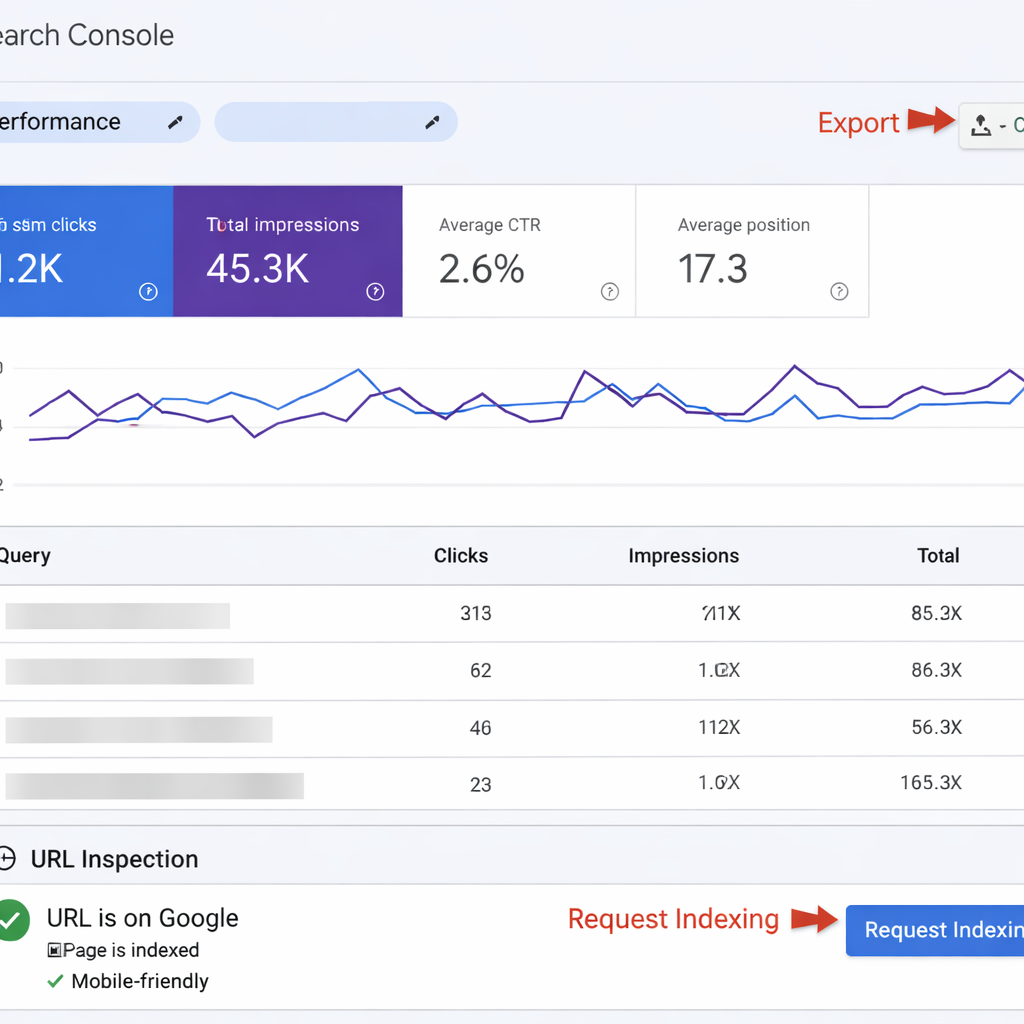
Authoritative view on indexing: Google Search Console delivers the single most important signal about how Google actually sees your site – which URLs are indexed, which are blocked, and which queries return your pages. Use it first for triage because no other free seo audit tool reports direct indexation status and query-level impressions from Google itself.
Search Console tells you what happened; it will not tell anyone else. If the recurring job is getting that picture in front of a client or a founder every week, automated SEO reports assemble and send it without anyone exporting a thing.
Core outputs and why they matter
- Index Coverage report: shows pages that are indexed, excluded, or erroring – high priority when excluded pages have impressions.
- Performance report: query and page level impressions, clicks, CTR and average position – the best free data to prioritise pages by traffic potential.
- URL Inspection tool: live testing for single URLs – useful to validate fixes and request reindexing after a change.
- Enhancements and Mobile Usability: structured data, breadcrumbs, AMP and mobile errors that directly affect SERP features and mobile experience.
- Manual actions and Security issues: immediate red flags that demand urgent remediation.
Practical limitation: Google Search Console is not a site crawler. It will not find all broken internal links, duplicate meta tags across thousands of pages, or offer a waterfall for page speed. In practice that means GSC should be the control plane for prioritization – use it to pick which pages and issues matter most – then run a crawler or performance tool to diagnose root cause.
Concrete example: A SaaS marketing site shows a decline in impressions for a product page. The Performance report reveals steady impressions but falling CTR and the Coverage report marks the canonical as submitted but not indexed. The real problem was a canonical pointing to a staging URL. Fix the canonical, use the URL Inspection tool to validate the corrected header, then request indexing. Track the page in Ranklytics to observe position recovery and CTR changes over the next 2 to 4 weeks.
Meaningful judgment: For small teams with limited time, Google Search Console gives the highest signal to cost ratio. It tells you what errors will actually block search traffic and which pages are worth investing developer time on. However, relying on GSC alone creates blind spots – you will miss structural and resource-level problems that only a crawler or speed tool will expose.
2. Google PageSpeed Insights (Lighthouse)
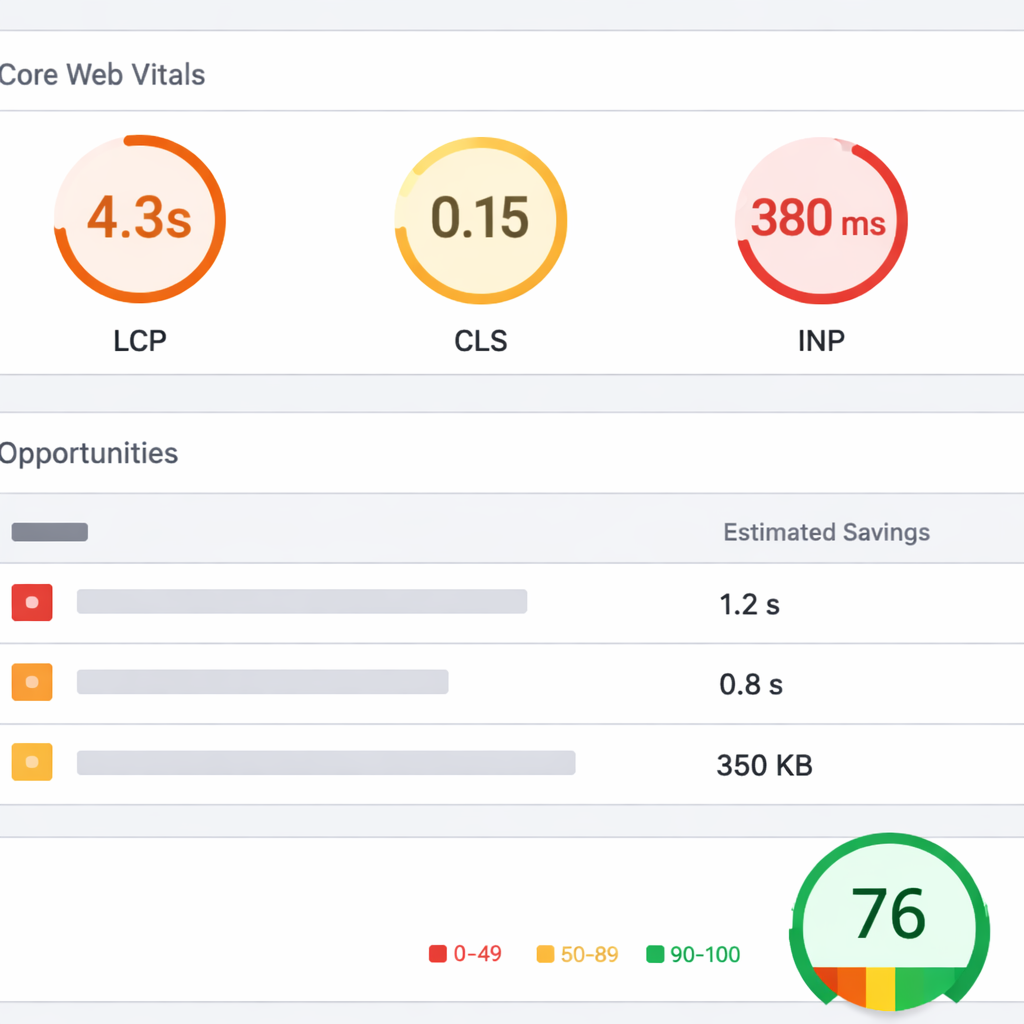
Practical point: Google PageSpeed Insights is the single best free seo audit tool for diagnosing page performance and Core Web Vitals. It combines lab Lighthouse runs with real user field data where available, and returns prioritized opportunities with estimated savings — the outputs are designed to point straight at developer work that improves perceived speed and user experience. See PageSpeed Insights docs.
What the report actually gives you
Key outputs: LCP, CLS, INP (or FID for older reports), a Lighthouse performance score, and two sets of diagnostics: Opportunities with estimated time savings and Diagnostics listing rendering and resource issues. The field data section uses Chrome UX Report and will be empty for low traffic pages — the lab run is always present.
- Actionable recommendations such as compress images, remove render-blocking scripts, and reduce third-party impact
- Estimated savings so you can judge which fixes will likely move the needle, not just the score
- Field vs lab split that lets you see what real users experience versus a reproducible test
Limitation and trade-off: Lighthouse lab runs are useful for reproducible diagnostics but are sensitive to test conditions and can produce variable scores. Field data is authoritative for user impact but only exists for pages with sufficient Chrome traffic. That means you should not blindly chase a higher Lighthouse score site-wide; focus on pages where field signals or business metrics justify developer time.
Concrete example: A SaaS pricing page shows high impressions in Google Search Console but fails LCP in PageSpeed Insights. The lab report flags a full-width hero image and a third-party chat widget as primary offenders. Practical next steps were to convert the hero image to a modern format, preload the LCP image, and lazy-initialize the chat widget — those three changes cut initial render time by roughly half on that page and improved conversions in A/B testing.
How to use PSI results without wasting time
Prioritize by traffic and intent, not score. Run PageSpeed Insights on your top 20–50 pages by impressions or conversions first. Fixes on those pages deliver measurable ROI; fixes on low-traffic pages rarely move business metrics even if they improve the Lighthouse score.
- Export your top pages from Google Search Console or analytics and run PSI on that list.
- Treat Opportunities as hypotheses: apply the change on one page and re-test lab results, then monitor field metrics and conversions.
- Track performance fixes alongside content and ranking work in your project tracker so you can attribute traffic changes correctly.
Judgment most teams miss: PageSpeed Insights tells you where to act but not which pages matter to your business. Marketers who treat the Lighthouse number as the objective mistake development time for impact. The higher-return approach is pairing PSI diagnostics with search/impression data and conversion value to create a prioritized backlog.
Field Core Web Vitals plus page impressions beat a universal pursuit of higher Lighthouse scores.
Integration tip: Combine PSI outputs with your content and ranking priorities in Ranklytics to create combined performance+content tasks. For a practical workflow, import top-impression pages from Google Search Console, run PSI for each, and add the highest-impact performance fixes to the same sprint as any content updates. For more on converting audit outputs into actions, see Why Your SEO Audit Is Not Delivering Results.
3. Screaming Frog SEO Spider (free version)
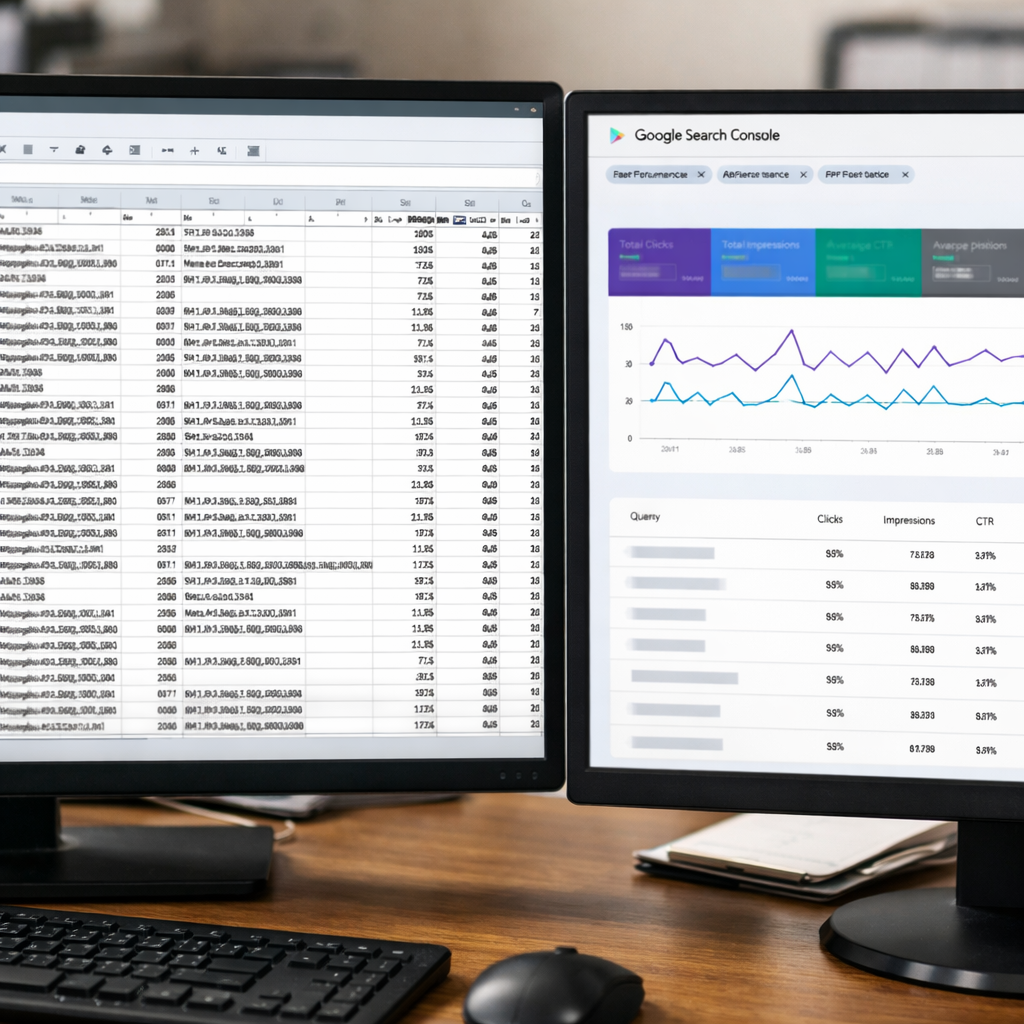
Straight rule: Screaming Frog is the best free desktop crawler for turning unknown structural problems into exact CSV tasks you can hand to a developer or content editor. It is not a complete replacement for a sitewide paid crawler, but for sites under 500 URLs it gives the highest signal-per-minute of any free seo audit tool.
What Screaming Frog actually surfaces
Core outputs: HTTP status codes, redirect chains, duplicate and missing meta titles and descriptions, H1/H2 presence, indexation directives, hreflang flags and basic canonical problems. Exports are raw and granular so you can filter by directory, response code, or content length and deliver precise fix lists.
- Developer friendly exports: CSVs for response codes, redirect chains, and duplicate titles ready for quick triage
- On page signals: missing titles, multiple H1s, thin content flags via word counts
- Link mapping: internal link counts per page to identify weakly linked important pages
- Redirect and canonical diagnostics: chain length, temporary redirects, and conflicting canonicals
Important limitation to plan for: the free version stops at 500 URLs. For small sites that is often enough. For larger sites you must be selective – crawl sections, use a seed list, or join Screaming Frog exports with Search Console top pages to focus on high impact URLs.
Practical workflow – how to get value without a license
Step 1: Run a full crawl on the entire site if it is under 500 URLs. If larger, export the top 500 pages from Search Console and crawl that list to concentrate on pages that already drive impressions. Google Search Console data matters here.
- Export 404 and 500 response codes as CSV and send to engineering with exact URL, referring page, and click evidence where available
- Export duplicate title and meta description lists, then sample 10 of the highest impression pages and decide whether to consolidate or rewrite
- Map internal link counts to priority pages to identify content that needs internal promotion
Concrete example: a 320 page ecommerce site used the free Screaming Frog crawl to find a pattern of category pages all using the same auto generated title. After exporting duplicate titles and cross referencing with Search Console impressions, the team rewrote 30 high impression titles, resulting in improved click through rate within four weeks.
Trade off to accept: Screaming Frog gives raw, actionable detail but little context. Do not treat its findings as higher priority than pages that actually receive traffic. Always combine its exports with search performance data before scheduling fixes.
Screaming Frog is the best free website audit tool for precise structural fixes on small to mid sized sites, but you must layer traffic data to prioritise effectively.
Next consideration: If you need continuous monitoring, scheduling, API access or to crawl beyond 500 URLs, budget for the paid license or use Screaming Frog selectively and integrate its exports with a workflow tool like Ranklytics so audits become repeatable and measurable.
4. Ahrefs Webmaster Tools
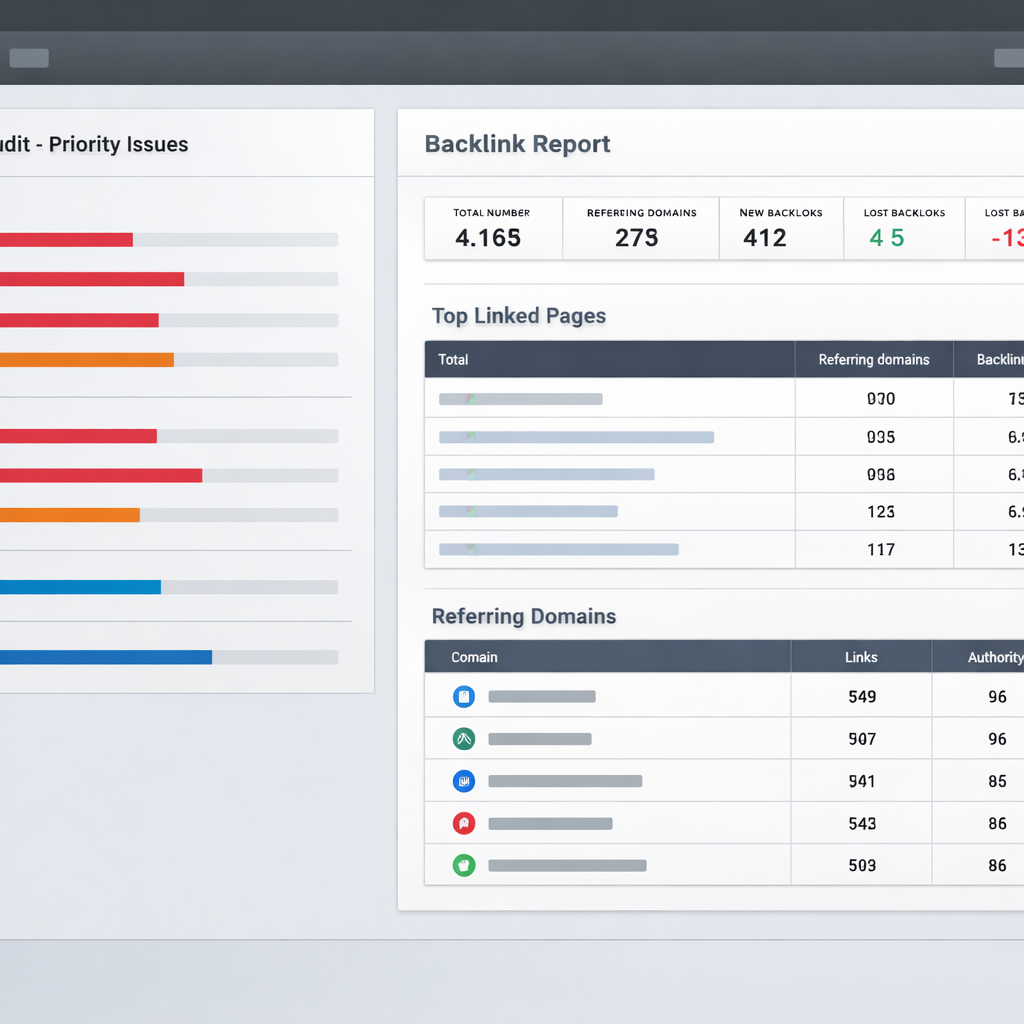
Ahrefs Webmaster Tools is the free seo audit tool that matters when you need technical issues tied directly to link equity. It combines a site audit engine with backlink reports for verified domains, which makes it uniquely useful for prioritizing fixes that actually protect or unlock organic traffic rather than chasing low-impact checklist items.
What it surfaces and how to use those signals
Core outputs: crawl health and issue priority, top linked pages, referring domains, anchor text distribution, internal linking suggestions. Use the site audit for the usual technical flags, but treat the backlink reports as the decision filter: problems on pages with extensive referring domains are almost always higher priority.
- Backlink context: shows which pages receive real external links and the anchor text those links use – not just raw link counts.
- Priority scoring: the audit ranks issues; combine that with linking data to triage what to fix first.
- Historical link trends: helps spot recent link loss events that coincide with traffic drops.
- Internal linking suggestions: practical hints to redistribute link equity without heavy engineering.
Practical limitation: you must verify the site to access full backlink reports and the free tool has smaller crawl and data depth than paid Ahrefs. It will not replace a full enterprise crawl for very large sites, and you cannot research competitor domains from AWT the same way you can with a paid Site Explorer account.
Auditing your backlink profile is one problem; growing it is another. If the gap the audit reveals is simply too few referring domains, a vetted backlink exchange is a faster route than manual outreach.
Trade-off worth noting: the tool surfaces many low-severity HTML issues. In practice, stop treating every meta tag as urgent. Prioritize by external link evidence and impressions from Google Search Console so your engineering effort preserves or improves pages that already attract referral signals.
Concrete example: a mid-market SaaS site found a product comparison page with 85 referring domains but returning 404. Ahrefs Webmaster Tools flagged the status code while showing the top referring domains and anchor text. The team restored the page and redirected historical URLs to the revived page, then used Ranklytics to generate a brief and track rankings for the target keywords.
Judgment: for small teams with limited time, AWT delivers higher ROI than many free crawlers because it points you at pages where external signals already exist. Fixing a high-link, low-quality page yields measurable ranking and traffic gains faster than fixing dozens of minor meta issues across low-value pages.
- Verify your domain in Ahrefs Webmaster Tools and start a site audit.
- Export top linked pages and filter for non 200 responses or canonical issues.
- Resolve by restoring content, 301 redirecting, or consolidating and then update internal links.
- Import top linked pages and referring keywords into Ranklytics to create content optimization tasks and track impact.
5. GTmetrix
Direct value: GTmetrix is the free website audit tool you pick when you need a forensic, resource level view of why a page renders slowly – waterfall timings, resource ordering, and third party impact, not a site wide crawl.
What you get: A lab test that combines Lighthouse metrics with GTmetrix proprietary timing breakdowns, a detailed waterfall chart, resource size and timing, filmstrip or video of the page load, and prioritized recommendations for resource optimization. Use the official site at GTmetrix to run tests.
How GTmetrix differs from other free performance tools
- Waterfall first: GTmetrix shows exact start and end times for every request so you can see which resource blocks rendering or delays Largest Contentful Paint.
- Third party clarity: It makes third party scripts visible in the timeline, which is where many teams actually find their biggest wins.
- Lab focus only: Unlike PageSpeed Insights which surfaces field data from Chrome UX Report, GTmetrix tests are lab runs – useful for debugging, not for replacing RUM.
Key limitation to plan for: Free accounts have limited test locations, fewer throttling profiles, and no automated bulk scanning. GTmetrix excels at single page diagnosis. If you need a site wide performance baseline you will either test a prioritized sample of pages or combine GTmetrix outputs with a crawler like Screaming Frog or Ahrefs Webmaster Tools.
Bulk and recurring scanning is where free tools consistently stop. If you need the same checks run on a schedule across every page, that is exactly what SEO autopilot automates.
Practical teardown and actions
Concrete example: An e commerce product page has a 4.7 second LCP in GTmetrix and the waterfall shows a reviews widget JavaScript taking 1.8 seconds before the main image request starts. The fix path is straightforward – move the reviews widget to async or load it after LCP, compress and serve the hero image from the CDN, and lazy load lower images. After those three changes the same GTmetrix test often shows LCP drop by 1.5 to 2 seconds.
Stepwise triage: Run a GTmetrix test from the nearest location, capture the waterfall, sort requests by blocking time, extract the top three slowest or largest resources, and convert each to an actionable ticket – compress image, defer script, inline critical CSS. Those tickets are high ROI because they map directly to visible timing improvements.
- Identify top 3 render blockers from the waterfall
- Assign priority by traffic – fix high traffic pages first
- Measure pre and post with the same GTmetrix test location and settings
A practical judgment: Teams obsessing over micro improvements measured in tens of milliseconds are wasting time unless those pages drive significant traffic or conversions. GTmetrix is best used to find large, obvious waste – oversized images, long running third party scripts, and blocking CSS. Those are the targets that move both metrics and user experience.
GTmetrix does not replace a site crawler – use it to validate and prioritize the most impactful speed fixes you will actually ship.
6. Ubersuggest (Neil Patel)
Practical claim: Ubersuggest is the easiest free seo audit tool to hand to a non-technical marketing manager who needs quick triage, keyword ideas, and a readable list of action items — but it should not be your only source for technical validation.
Keyword tools are good at telling you about terms you already thought of. Finding the ones you never considered is a different job — a content gap analysis works backwards from what competitors already rank for and you do not.
What it surfaces: The tool combines a site health score, a prioritized list of SEO issues, top-performing pages, basic backlink counts, and keyword suggestions with rough search volume and difficulty estimates.
Where Ubersuggest helps most
- Non-technical clarity: Clear, prioritized issue lists that a content manager or junior marketer can act on without a developer translating CSV exports.
- Content gap spotting: Useful for discovering low-hanging keyword opportunities and topic clusters when you pair its keyword suggestions with top pages.
- Quick competitive checks: Easy domain comparisons to spot competitors ranking for similar keywords without a paid account.
Key limitation and trade-off: The site health score is a blunt instrument. It compresses many different problems into a single number using an opaque weighting system — useful for triage, dangerous as a performance yardstick. Treat the score as a prompt to inspect high-severity items, not as evidence that your site is healthy.
Data quality judgment: Its backlink and keyword volume estimates are convenient but statistically noisier than enterprise sources like Ahrefs or Majestic. In practice that means Ubersuggest is fine for idea generation and prioritization on small sites, but do not rely on its backlink counts for outreach or link valuation decisions.
Concrete example — real use case
Concrete Example: A niche e-commerce site used Ubersuggest to run a weekly site audit and found a cluster of product pages with thin meta descriptions and low internal links. The team rewrote descriptions, added internal links from category pages, and created two long-form buying guides from Ubersuggest keyword suggestions. Within eight weeks organic traffic to those product pages rose 18% and average position improved by three spots for priority terms — but the team validated indexing and impressions in Google Search Console before declaring success.
- Actionable steps: Run a site audit, export the high-severity issues, and fix blocking items first (404s, canonical loops).
- Cross-check: Match Ubersuggest top pages and keyword ideas against Google Search Console impressions to prioritize pages that already get clicks.
- Integrate: Import keyword ideas and prioritized pages into Ranklytics to build content briefs and track ranking movement after you implement changes. See Why Your SEO Audit Is Not Delivering Results (And How to Fix It) for a workflow on converting audit signals into tasks.
If you need a friendly, actionable free website audit tool for small sites and content planning, Ubersuggest is high ROI — but always validate technical flags with a crawler and indexing data.
7. Ranklytics AI SEO Audit and Content Planner
Clear focus: Ranklytics is not a replacement for a crawler or a page speed tool – it is a content-first audit and planning layer that turns signals from free SEO audit tool outputs into prioritized editorial work and measurable experiments.
What Ranklytics adds to a stack of free tools
Signal to task conversion: Where Google Search Console, Screaming Frog, and PageSpeed Insights surface issues, Ranklytics groups those signals around pages and keywords, scores expected traffic upside, and generates ready-to-assign content briefs so teams can act without debating format or scope.
Measurement and attribution: Ranklytics tracks keyword movements and ties them to content versions and publish dates so teams can test which changes actually move rankings — a practical fix for the common problem of audits that generate recommendations but do not prove impact. See why audits fail in practice in Why Your SEO Audit Is Not Delivering Results (And How to Fix It).
- Automated briefs based on SERP intent: Ranklytics produces outlines that include headings, key questions to answer, and suggested target keywords derived from current rankings and competitor SERPs.
- Prioritization by expected ROI: It ranks opportunities by impressions, position, and topical relevance so teams focus on pages where content edits will likely yield measurable traffic.
- Experiment tracking: Create a task, publish a change, and monitor whether rankings and impressions move over 4 to 12 weeks.
Limitation that matters: Ranklytics is not a deep technical scanner. It will not find server misconfigurations, complex redirect loops at scale, or the full set of response code anomalies that a dedicated crawler reveals. Use it together with a free website audit tool for technical coverage and with PageSpeed Insights for Core Web Vitals.
Practical workflow – how to use Ranklytics with free audits
- Run a technical pass with a free site audit tool such as Screaming Frog free version or Ahrefs Webmaster Tools and export pages with indexing or redirect problems.
- Pull performance and Core Web Vitals from PageSpeed Insights for high impression pages.
- Import the candidate pages into Ranklytics, generate a content brief, assign the brief, and schedule an A B style experiment or single revision.
- Track keyword positions and impressions inside Ranklytics and compare against the audit timestamps to attribute impact.
Concrete example: A mid market SaaS team found a blog category with several pages ranking between positions 9 and 15 for commercial intent keywords. After importing those pages into Ranklytics and applying AI generated briefs that tightened intent and added comparison content, the team tracked position changes and impressions week over week to validate which brief templates worked best.
Judgment call: For small teams with limited developer time, Ranklytics delivers more immediate ROI than more technical tools because content fixes are faster to test and measure. For sites where crawling or indexation problems are the gating factor, invest time first in a free technical audit and then use Ranklytics to convert the remaining opportunity into content action.
Ranklytics is a content operations and measurement layer – pair it with a free website audit tool for technical coverage and a performance tool for UX metrics before prioritizing fixes.
8. Bing Webmaster Tools
The most underrated free auditor on this list. Everyone verifies Google Search Console and stops there, but Bing Webmaster Tools includes something GSC does not: an actual site crawler. Its Site Scan audits up to 10,000 URLs per crawl and flags missing metas, thin content, broken links, and header problems — the category of issue you otherwise need Screaming Frog for, with no 500-URL cap.
- Site Scan: a real on-demand crawler with severity-ranked findings — the closest free substitute for a paid crawl on mid-sized sites.
- Keyword research tool: free query volume and suggestion data with no daily paywall, useful for validating Ubersuggest’s noisier estimates.
- One-click GSC import: verifies your site by pulling from your existing Google Search Console property, so setup takes about a minute.
- IndexNow: push URL changes for near-instant indexing on Bing and partner engines.
Practical limitation: its search performance data reflects Bing’s index and traffic, which for most sites is a fraction of Google’s. Use it for the crawler and keyword data, not as your source of truth on rankings. In our test it caught a set of paginated pages with duplicated descriptions that GSC never surfaced — findings we then prioritized against GSC impression data.
9. Seobility
The closest free thing to a paid all-in-one suite. Seobility’s free plan gives you one project with a 1,000-page crawl, an aggregate SEO score, weekly recrawls, and a prioritized to-do list. For a beginner who wants a single number to watch and a ranked list of fixes, it is the gentlest starting point of the nine tools here.
- Continuous monitoring: weekly automatic recrawls catch regressions without you remembering to re-run anything.
- Readable to-do list: issues grouped by theme (meta, content, structure, technical) with plain-language explanations.
- Rank tracking included: a small number of keywords tracked free, enough for a hobby site’s core terms.
Practical limitation and trade-off: like Ubersuggest’s health score, the single aggregate number compresses very different problems into one figure — a site can score in the 80s while its most valuable page is deindexed. Treat the score as a trend line, not a verdict, and validate anything critical in Google Search Console. Larger sites will hit the 1,000-page crawl cap quickly.
Go deeper: Once you have run an audit, the natural next steps are picking a full platform — see our tested comparison of the 12 best AI SEO tools — and tracking whether your fixes actually move rankings, covered in our guide to free SEO ranking checkers. Or skip setup entirely and run the Ranklytics free SEO audit, the only tool here that also scores your visibility in ChatGPT and AI Overviews.
Frequently Asked Questions
Key point: Treat every free seo audit tool result as a signal, not a verdict. Free tools surface useful patterns and errors, but each one samples different data, applies different heuristics, and has limits on crawl size and freshness. Use outputs to prioritize work; do not use a single report as a checklist to blindly execute fixes.
Short answers to the most common questions
- Which free tool gives the most authoritative indexing data: Use Google Search Console for index and query authority because it shows what Google actually saw.
- Can free tools cover a medium sized site: Yes for high impact signals, but free site audit tool limits mean sampling bias – large sites need paid crawling or segmented audits to avoid blind spots.
- When tools conflict on an issue: Prioritize by downstream impact – pages with impressions or rankings first, then errors that block indexing, then UX and performance.
- Do performance tools overlap: Yes on Core Web Vitals; use PageSpeed Insights for field metrics and a waterfall tool for resource level debugging.
Practical limitation: Free tools commonly yield false positives on template driven problems. For example, duplicate title warnings from a crawler often come from paginated templates or CMS defaults rather than unique content errors. Verifying whether the flagged pages are actually indexed or ranking is a necessary next step before mass edits.
Concrete Example: A mid sized SaaS site ran a free crawl and found 400 pages flagged for duplicate meta titles. The team sampled the top 30 flagged pages and discovered the issue was a CMS module appending a short campaign tag to titles. They used a focused regex fix on the template, re crawled only affected sections, and monitored impressions in Search Console to confirm no ranking regression.
Judgment you will not read everywhere: For most small teams the highest ROI comes from combining one field data check, one crawler sample, and a content signal source. Running dozens of free tools on the same site creates noise and paralysis. Pick complementary tools and run them on a cadenced schedule that aligns with your release cadence.
How to resolve conflicting recommendations in practice
- Map each issue to traffic impact: Tag issues by pages with impressions or rankings first.
- Confirm indexing state: Use the tool that shows index state for that page as the tiebreaker.
- Run a narrow verification crawl: Reproduce the problem on a 1 to 5 percent sample before broad fixes.
- Create a rollback plan: Apply template or CMS changes behind feature flags when possible.
| FAQ | Practical action |
|---|---|
| Conflicting duplicate tags | Sample top ranking pages, fix template if sample shows problem, monitor Google Search Console |
| Too many low severity issues | Focus on high impression pages then schedule low severity fixes to release windows |
| Crawl limit exceeded on free crawler | Segment site by directory or traffic tier and prioritize high value sections |
Final takeaway: Use free website audit tool outputs to create repeatable, prioritized batches of work – validate with live index and traffic signals, limit scope to high value pages, and measure impact over a release window. If audits keep producing a long tail of low value noise, change the selection criteria rather than run more tools.

Written by
Emma RodriguezEmma is a digital marketing consultant specializing in technical SEO and international search strategy. With a background in linguistics and data analytics, she helps brands expand into new markets through multilingual SEO and structured content frameworks.