











Table of Contents
SEO Writing Tools Reviewed: Write Content That Actually Ranks
Picking the right seo writing tools matters more than chasing the latest AI feature; the right toolset shortens research time and produces content that matches search intent. This article tests leading tools side by side – keyword research and clustering, SERP-aware content editors, AI drafting assistance, integrations and workflow, plus pricing and value – and includes compact workflows you can apply to a single blog post. Ranklytics is reviewed alongside Surfer, Clearscope, MarketMuse, and others so you can decide which tools fit freelancers, in-house teams, or agencies.
1 Surfer SEO
Short verdict: Surfer SEO is the go to tool when your priority is matching the on page signals of current top ranking pages quickly and getting a prescriptive brief writers can act on. Teams that need predictable, repeatable briefs and fast editorial handoffs will get the most value.
What Surfer does in practice
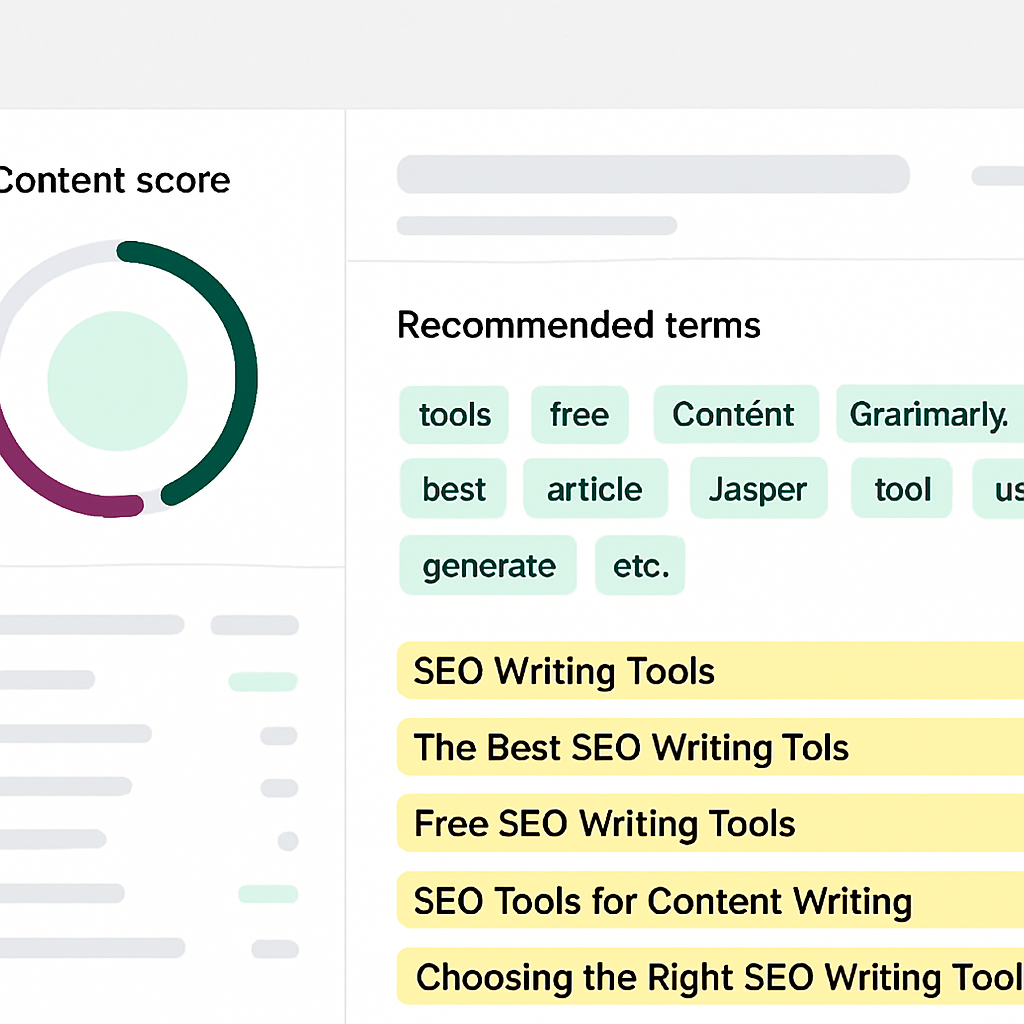
- Content Editor: live content score that compares your draft to the top ranking pages and highlights missing terms and headings
- SERP Analyzer: structural breakdown of top results including word count, headings, and common phrases
- Brief automation and audits: generate a brief in minutes and run on page audits after draft
- Integrations: Google Docs and WordPress, plus partnerships like Surfer x Jasper for drafting
- Keyword tools: basic discovery and clustering tied into the editor
Practical tradeoff: Surfer is highly prescriptive, which is useful and dangerous. Its content score maps to concrete items you can fix, so you reduce subjective revision rounds. But teams that follow the score mechanically end up chasing word count and lists of keywords without validating search intent or depth. Use the score as a diagnostic, not a production rule.
Mini workflow — from keyword to publish
- Run the keyword seo writing tools in Surfer and open the
Content Editorfor the top 10 SERP snapshot. - Generate a brief and copy suggested headings and high frequency terms into the outline; mark which headings require original research or company data.
- Draft in Google Docs with the Surfer add on active so writers see live score and missing terms while writing.
- Run the Surfer audit before publish, then compare results in a rank tracker for 6 to 12 weeks to measure impact.
Concrete example: An in house SEO at a SaaS company used Surfer to build a 1,800 word pillar on seo writing tools. The brief supplied headings and 12 target terms; drafting in Google Docs with Surfer reduced editorial back and forth because writers adjusted content while watching the score. The team still validated user intent by checking the SERP features and trimming fluff suggested by the tool.
Where Surfer wins and where it falls short: Surfer wins when you need fast, actionable on page guidance and consistent briefs across writers. It falls short when projects demand deep topical modeling, multiday research, or strategic content planning across a site. For editorial depth and long term topical authority you will need a tool that performs broader topic gap analysis or pair Surfer with a content planning platform.
2 Clearscope
Straight answer: Clearscope is an editorial-first content optimizer that gives writers a single, easy-to-read grade and a concise list of semantically relevant terms — it is not a research suite. Teams buy Clearscope when they want cleaner briefs and fewer revision rounds, not when they need deep keyword discovery or site-wide topical planning.
Key practical insight: Clearscope excels at making content production repeatable for editorial workflows. Its simplicity reduces back-and-forth between SEO and writers because the brief reads like an editorial checklist rather than a technical audit. That makes it excellent for reducing edit cycles, but the tradeoff is limited upstream discovery – you will still need separate keyword research and rank-tracking tools for strategy and measurement.
How a single-article workflow looks in practice
- Prepare seed keyword: Start with your target such as
seo writing toolstaken from your content calendar or keyword list. - Run Clearscope: Paste the draft or working title into Clearscope to get a target grade and recommended semantic terms.
- Turn the output into a one-page brief: Provide the Clearscope grade, 6-12 recommended terms, and 3 suggested H2s to the writer.
- Edit to intent, not to density: Writers should use Clearscope terms naturally and check search intent against top SERP results before finalizing.
- Publish and track: Export the page to WordPress or Google Docs and use a rank tracker like Ranklytics to measure movement over the following 6 to 12 weeks.
Limitation and practical consequence: Clearscope is not a substitute for keyword discovery or competitor gap analysis. It surfaces related terms based on top-ranking pages, so for low-volume, niche, or transactional intent queries the recommendations can be shallow. If your content strategy depends on uncovering long-tail opportunities or mapping topical authority, pair Clearscope with a keyword research tool or with a platform that provides site-wide content inventory.
Concrete example: A B2B editorial team used Clearscope to standardize briefs for writers producing a monthly guide on seo writing tools. The team reduced internal revision rounds from three to one because writers received clear term lists and a grade up front. The group still used a separate keyword tool to find long-tail phrases and tracked outcomes with Ranklytics after publication.
- Strength: Clean, actionable grade that editors and non-SEO writers understand.
- Strength: Google Docs and WordPress integrations make it low friction for publishing teams.
- Weakness: Limited keyword discovery compared with full SEO suites – treat Clearscope as optimization not research.
- Weakness: Cost structure favors enterprise editorial teams; it may be expensive for freelancers or very small teams.

Further reading: For context on where optimization tools fit into a larger content program see Google Search Central SEO starter guide and the overview of SEO writing tools at Search Engine Journal.
3 MarketMuse
MarketMuse is a content strategy engine, not a quick on-page editor. Teams that need to build topical authority and fix site-wide gaps will see the value; teams chasing fast, single-article wins will find it heavy and sometimes prescriptive.
Core capabilities that matter
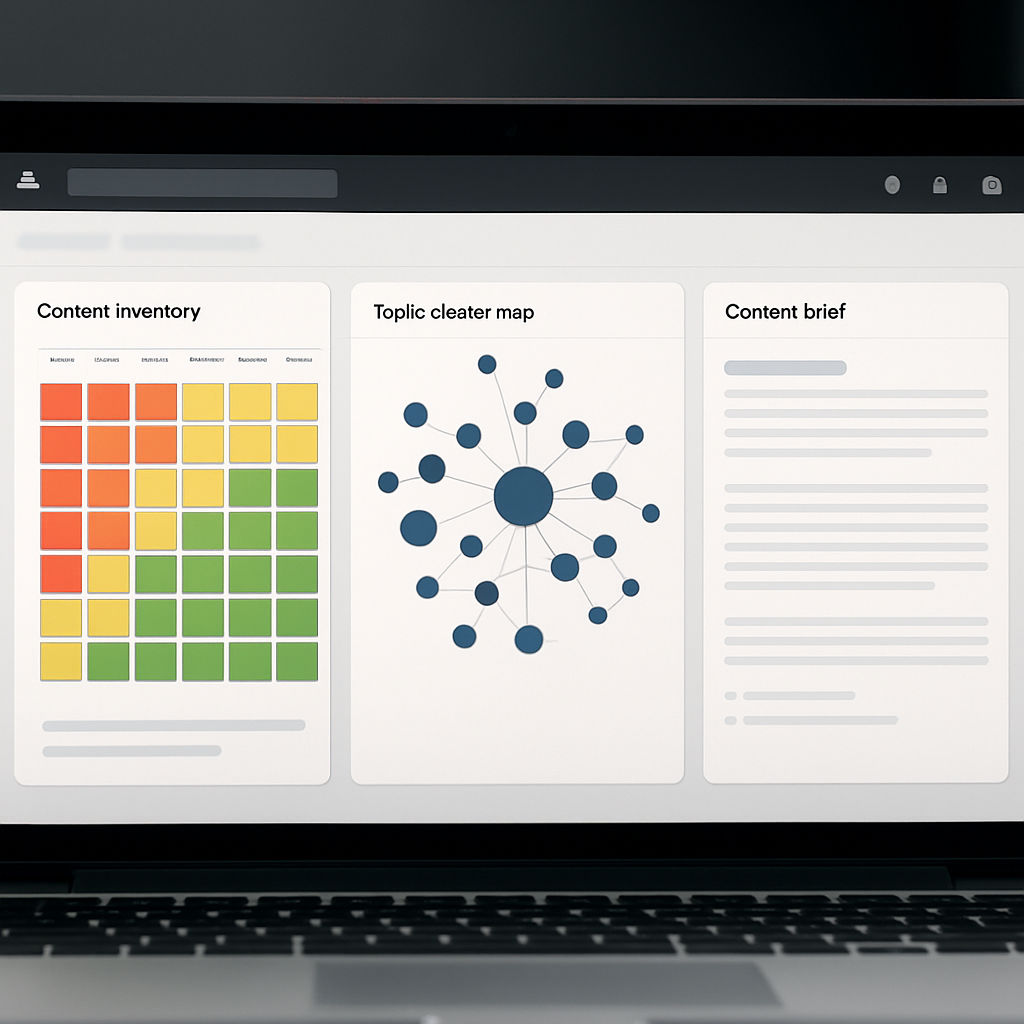
- Content inventory and gap analysis: scans your site to show topical holes and cannibalization across pages
- Topic modeling and relevance scoring: recommends which subtopics to include to build a defensible content hub
- Automated briefs and recommended headings: generates a research-backed outline with priority terms and content scores
- Workflow and collaboration: assign briefs, track drafts, and measure changes in topical relevance over time
Tradeoff to accept: MarketMuse requires scale to shine. It produces the best lift when you have multiple pieces to weave into a hub. For small sites or one-off posts the recommendations can read like overkill and deliver noisy priorities instead of clear tactical workstreams.
Concrete Example: Run a MarketMuse content inventory for the topic seo writing tools. The tool will surface under-covered subtopics such as semantic keyword analysis tools and headline analyzer tool for seo, then generate a brief that groups those subtopics under a pillar page and suggested cluster articles. A content manager can export those briefs to writers, schedule the cluster rollout, and track whether the sitewide topical score improves over subsequent months.
Practical limitation: MarketMuses topic scores can encourage chasing quantity over intent. In practice you should treat its recommendations as a prioritized research list, not as literal word counts or an exact heading map. Pair MarketMuse briefs with manual SERP checks and competitor analysis before sending to writers.
Where it wins in the real world: teams building a content hub for a complex product or niche SEO vertical. If your objective is to become the authoritative resource on a cluster of topics, MarketMuse shortens the discovery phase and highlights consolidation opportunities other tools miss. If you need end-to-end rank tracking and audits, combine it with a rank tracker or platform like Ranklytics to convert topical authority into measurable keyword movement. See Why Your SEO Audit Is Not Delivering Results (And How to Fix It) for audit wiring tips when using planning tools.
MarketMuse is strategic depth over speed. Use it to plan clusters and measure authority, not to crank out single posts.
4 Ranklytics
Direct point: Ranklytics is built around one practical promise — connect the content brief to measurable rank outcomes so teams stop guessing whether editorial work moved the needle. That focus changes how you evaluate value: the product is not just an editor or an AI writer, it is an instrumentation layer for content performance.
How Ranklytics fits a content workflow
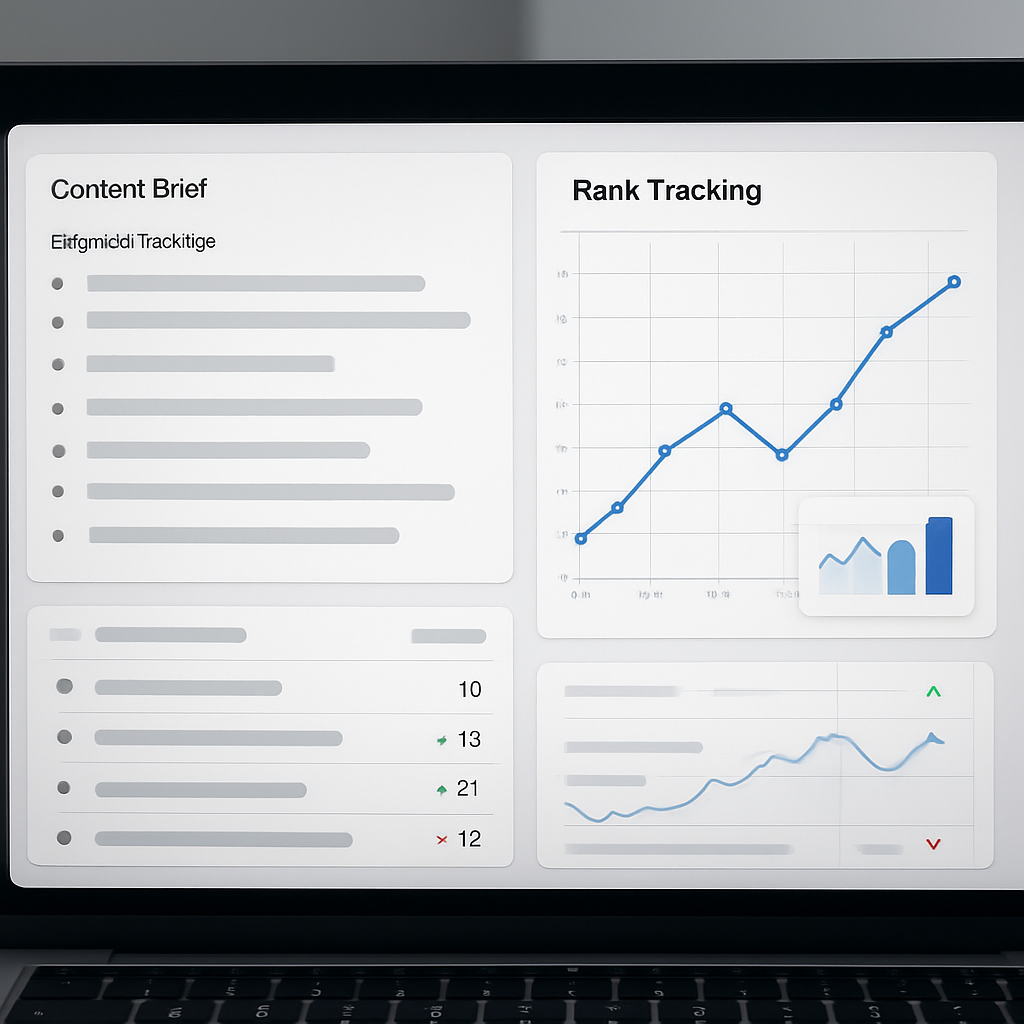
Quick workflow: Use Ranklytics when you want planning, writing, and tracking in one loop rather than stitching separate tools. The platform discovers keyword clusters, auto-generates briefs with top questions and heading suggestions, provides an AI-assisted drafting surface tuned for search intent, then attaches rank tracking and SERP-change alerts to the published URL.
- Discover: Run a keyword cluster for
seo writing toolsto surface long-tail variants and competitor pages. - Brief: Auto-generate a brief that includes top-ranking pages, common headings, and question-based subtopics — export or assign to a writer.
- Draft with intent: Use the Ranklytics editor to keep headings, intent signals, and suggested semantic terms in view while drafting.
- Publish & monitor: Push live, connect the URL to built-in rank tracking and Google Search Console, and watch SERP movement tied to the brief that created the page.
Practical trade-off: The single-platform flow reduces handoffs and reporting overhead, but it also concentrates risk — if the brief or intent model is off, your monitoring will show failure faster. Validate briefs against the top 3 SERP intents manually before heavy distribution.
Limitation to budget for: Ranklytics blends AI writing with SEO signals, but it is a younger entrant compared with legacy players; expect quirks in topic modeling and occasional overreach from AI suggestions. In practice, that means an editor should spend 10–20% more time validating facts and EAT cues on first drafts than with mature editorial stacks.
Concrete example: A SaaS content lead used Ranklytics to target the keyword seo writing tools. They generated a brief emphasizing comparison-style headings and FAQ items, assigned the brief to a writer, published the page, and monitored rank movement over 10 weeks. The value was not instant ranking — it was the ability to tie a content version to a measurable keyword cluster and see which headings correlated with position changes.
Ranklytics' real advantage is traceability: briefs, drafts, and rank changes live in the same view, so you can prove which editorial decisions affected visibility.
If you want to dig deeper into audit-driven workflows that complement Ranklytics, see Why Your SEO Audit Is Not Delivering Results (And How to Fix It) for practical audit glue you can pair with content tracking.
5 Frase
Frase is fastest at turning SERP signals into question-led briefs and FAQ content, not at building deep topical authority. If your workflow needs rapid, research-driven briefs that map user questions, Frase will save time. If you need sophisticated semantic modeling or enterprise content governance, it will feel lightweight.
Core capabilities: automatic brief creation from the SERP, a robust question extractor that surfaces People Also Ask and forum-style queries, an AI content writer, and an editor with a basic content score and Google Docs and WordPress integrations. The question extractor is the feature teams use most for crafting FAQ sections and answer-first pages.
Tradeoff to accept: speed over depth. Frase generates a lot of useful surface signals quickly, but the content score is less granular than Surfer or Clearscope and its topic coverage is not a substitute for site-wide topical mapping tools like MarketMuse. Expect to spend editorial time converting Frase output into EAT-compliant, source-linked copy.
Mini workflow
- Quick brief: Enter the target keyword and let Frase scrape top results and extract questions.
- Prioritize intent: Mark which extracted questions map to commercial, informational, or navigational intent before writing.
- Build the draft: Export the brief to Google Docs or WordPress, or use Frase writer for a first draft.
- Humanize and verify: Add original research, links to authoritative sources, and editorial voice. Run a final check against top SERP pages.
- Measure and iterate: Add the published page to a rank tracking tool such as Ranklytics to monitor movement and adjust content.
Concrete example: For the keyword seo writing tools, Frase will return PAA and long tail questions like what are the best seo writing tools for freelancers and how to choose seo content creation tools. Use those questions to build an FAQ block and heading structure, then export the brief to WordPress so a writer can expand each answer into 150 to 300 word paragraphs with citations.
What teams misunderstand: many users run the AI writer, skim the output, and publish. That pattern works poorly. In practice the AI draft needs factual checks, added examples, and author signals to rank consistently. Treat Frase as a research and brief generator, not a publishing autopilot.
Frase reduces research time dramatically but does not remove the editorial work required to meet EAT and search intent.
Takeaway: use Frase when speed and question coverage matter – for FAQ pages, rapid briefs, and initial drafts – but validate intent, add authoritative sources, and track results with a dedicated rank tracker before declaring success.
6 SEMrush SEO Writing Assistant
Bottom line: the SEMrush SEO Writing Assistant is a pragmatic on-page checker best used as an extension of SEMrush keyword data, not a substitute for a full SERP-aware content editor.
How teams use it in practice
Typical workflow: pull seed keywords from the Keyword Magic Tool or Topic Research, draft in Google Docs with the Writing Assistant plugin active, run the plagiarism check, then validate with SEMrush On Page SEO Checker and a rank tracking campaign.
- Integration advantage: uses SEMrush keyword and site audit data so writers do not need to copy metrics between tools
- Editor checks: readability score, tone suggestions, keyword usage advice and a basic SEO score inside Google Docs or WordPress
- Plagiarism safety net: built-in check reduces the risk of duplicate content slipping through reviews
Practical insight and tradeoff: readability and tone adjustments here move conversion and engagement more than rankings. The Writing Assistant will keep keyword usage sensible and flag duplicate passages, but it does not perform deep SERP content modeling or recommend the semantic terms top competitors use. For topical depth you still need a SERP-based briefer like Surfer or manual competitor analysis using Top SEO Competitor Analysis Tools to Outrank Your Competition – Ranklytics.
Concrete example: A SaaS content team planning an article on seo writing tools runs Topic Research to capture popular headlines and questions, then opens a draft in Google Docs with the Writing Assistant. The Assistant enforces a consistent readability band for product marketers and flags a 12 percent copied paragraph from a vendor page before publishing, which saves an hours-long manual review.
- Strength: low friction for teams already on SEMrush – data flows from keyword research to the editor
- Strength: useful plagiarism checks and tone/readability controls that help match audience level
- Weakness: weaker at suggesting semantic LSI terms and competing heading structures compared with Surfer or Clearscope
- Weakness: not a standalone content planning platform – best combined with SEMrush Position Tracking and On Page SEO Checker
What people miss: many teams treat the Writing Assistant as an optimization oracle and over-index on its on-page score. That is a mistake. Matching readability and avoiding duplication are necessary hygiene steps, but ranking gains usually require addressing search intent, question coverage, and depth – none of which the Writing Assistant models with the granularity of specialized content editors.
Next consideration: if your team already pays for SEMrush and you need consistent editorial controls plus plagiarism checks, enable Writing Assistant and route drafts through it. If you need prescriptive, SERP-matching content briefs to compete on competitive topics, budget for a dedicated content editor as well.
7 WriterZen
Quick take: WriterZen is strongest at keyword clustering and topic mapping – not at final on-page scoring. For teams that need to organize hundreds of long tail keywords into sensible content buckets, WriterZen often saves hours compared with manual spreadsheets.
How it actually helps content programs
Practical use: Use WriterZen to generate clusters from a seed list, then build a topical map that becomes your editorial calendar. The platform surfaces related questions and long tail variants and groups terms by co-occurrence, which makes it easy to decide whether to create a single comprehensive hub post or several narrowly targeted articles.
- Strength: Robust keyword clustering and topical map visualization that scales planning for multiple authors
- Weakness: Clusters can mix different search intents – manual SERP validation is required before drafting
- Strength: Lightweight content creator that produces outlines and quick drafts for briefing writers
- Weakness: AI draft quality is variable; expect to edit heavily for accuracy and EAT signals
Concrete example: For the keyword seo writing tools, run a seed list through WriterZen to produce clusters like commercial comparisons, how-to tutorials, and feature-focused pages. Export the topical map, assign one cluster per writer, and use the built-in outline generator to create briefs. Finalize the brief only after checking the top 10 SERP results for intent mismatches.
Trade-off to accept: WriterZen speeds planning but is not a replacement for SERP-aware content editors. If your priority is producing content that mirrors on-page signals of current top ranking pages, supplement WriterZen with a SERP analysis tool or use a rank tracker to measure outcome.
Integration note: WriterZen covers discovery and drafting, but it has less mature rank tracking and CMS integrations than market leaders. For measurable ROI link your WriterZen output to a rank tracking platform like Ranklytics so you can turn topic maps into tracked keyword sets.
If your problem is chaotic keyword lists and slow brief creation, WriterZen is a pragmatic pick. If your problem is squeezing extra ranking points from specific pages, expect to pair WriterZen with a SERP-aware editor.

Written by
ranklytics